Tampilkan postingan dengan label Tips And Trick. Tampilkan semua postingan

Tips Mengkonsumsi Minuman Yang Baik Untuk Tubuh


Minuman ringan, minuman berenergi atau jus buah buatan memang sangat populer, namun minuman tersebut memiliki efek buruk pada kesehatan Anda. Sebaliknya, ada beberapa minuman yang justru sangat bagus untuk kesehatan. Apa saja?

Minuman ringan bersoda, minuman berenergi dan jus buah buatan kebanyakan mengandung gula. Ini membuatnya tinggi kalori tanpa ada kandungan gizi.

Setidaknya ada 6 minuman yang bagus untuk kesehatan.. berikut daftarnya..:

1. Air putih


Air putih adalah cairan paling dasar yang dibutuhkan tubuh manusia. Air diperlukan untuk memainkan fungsi di otak, ginjal dan jantung. Hidrasi yang tepat membantu menjaga sendi dan pelumasan otot. Air bahkan bisa membantu Anda dalam menurunkan berat badan dengan menekan nafsu makan dan mempercepat metabolisme. Dianjurkan minum 8 gelas air putih setiap hari.

2. Jus buah dan sayur segar

 
Buah dan sayur sangat dibutuhkan untuk kesehatan, tetapi mengonsumsinya dengan dimakan biasa terkadang bisa membosankan, sehingga menikmatinya jus buah atau sayur adalah salah satu pilihan yang baik. Tapi sebaiknya tidak menambahkan banyak gula pada jus segar tersebut.

3. Teh hijau


Teh hijau merupakan gudang dari mineral dan antioksidan. Hal ini dapat meningkatkan metabolisme sehingga membantu menurunkan berat badan, otak menjadi rileks, meningkatkan kesehatan jantung dan bahkan dapat mengontrol diabetes dan eksim.
Flavonoid dan polifenol yang terkandung dalam teh hijau dapat membantu meningkatkan kekebalan tubuh ke tingkat yang luar biasa, dan kandungan catechin hadir dapat menghilangkan kantuk dan bekerja sebagai pengurang stres.

4. Susu

 
Kalsium dalam susu tidak hanya membantu memperkuat tulang tetapi juga berkontribusi terhadap pengrusakan lemak yang tersimpan dalam sel-sel lemak dalam tubuh. Jika Anda berencana menurunkan berat badan atau takut dengan kandungan lemak dalam susu, pilihlah susu skim.

5. Kopi

 
Kopi juga merupakan minuman sehat bila dikonsumsi tidak terlalu banyak (1 atau 2 cangkir per hari). Kafein telah lama dikenal untuk meningkatkan kewaspadaan. Selain itu, kafein juga dikenal dapat melindungi tubuh dari penyakit Parkinson, Alzheimer, bentuk-bentuk tertentu dari penyakit jantung dan kanker usus besar.
Penelitian terakhir juga menunjukkan bahwa dosis moderat kafein dapat mengurangu nyeri pasca latihan otot hingga 48 persen, sehingga membuat lebih mudah bagi pemula untuk transisi dari minggu pertama ke dalam program latihan yang lebih lama.

6. Buttermilk

 
Buttermilk adalah minuman yang sempurna untuk musim panas. Buttermilk menyediakan kalsium, vitamin B kompleks, kalium dan fosfor. Jika dibuat dari bakteri probiotik, hal tersebut juga bermanfaat untuk sistem pencernaan Anda.

"Your comment is precious little for the progress of this blog ..."
"Sedikit komentar anda sangat berharga bagi kemajuan blog ini..."
Read more »

Mencegah Virus dari Flash Disk Tanpa Anti Virus


Kadang kita suka khawatir jika ingin menancapkan flash disk ke dalam komputer kita. Kenapa? Karena semakin banyaknya virus yang beredar di sekitar kita, dan kadang menancapkan flash disk saja sudah cukup untuk membuat komputer kita terinfeksi virus tersebut. Melalui tulisan ini, saya ingin berbagi sedikit tips untuk mencegah komputer kita dari infeksi virus yang ada di dalam flash disk yang ditancapkan di komputer kita. Dan, ini bisa dilakukan tanpa antivirus. Bagaimana caranya? Berikut adalah caranya

1. Matikan autoplay

Banyak virus menjadikan fitur autoplay flash disk sebagai salah satu cara terampuh untuk dapat menginfeksi komputer kita dengan virus. Apa itu autoplay? Secara singkat, autoplay bisa didefinisikan sebagai sesuatu yang akan dilakukan oleh komputer ketika kita menancapkan flash disk kita ke dalamnya. Bagaimana komputer bisa tahu apa yang harus dilakukannya? Semua itu ada di dalam file “autorun.inf” yang biasanya di-hidden dan ada di dalam flash disk. Jika sebuah flash disk sudah terinfeksi virus, biasanya file ini sudah dimodifikasi untuk menjalankan file virus yang ada di dalam flash disk tersebut ketika flash disk itu ditancapkan. Oke, sekarang bagaimana caranya mematikan autoplay tersebut?

Pertama, install program TweakUI for Windows XP di sini.

Kedua, buka program TweakUI tersebut. Pilih menu “My Computer” > “Autoplay” > “Drives”, lalu hilangkan centang dari semua drives yang ada.

Jika sudah, tekan OK. Anda telah berhasil mematikan fitur autoplay pada komputer Anda.

2. Cara Membuka Flash Disk

Setelah Anda mematikan autoplay, Anda bisa dengan lega menancapkan flash disk ke dalam komputer Anda. Tetapi, Anda harus berhati-hati dalam membukanya. Mulailah dengan membuka “My Computer”. Lalu cobalah terlebih dahulu melakukan “klik-kanan” pada drive flash disk yang akan dibuka. Jika tulisan “Autoplay” berada di paling atas (mendahului “Open”), maka kemungkinan besar flash disk Anda sudah terinfeksi virus, tetapi komputer Anda tidak akan terinfeksi virus, kecuali jika Anda menjalankan file virus yang ada di dalam flash disk tersebut.

Satu hal yang perlu Anda perhatikan adalah jangan pernah membuka drive flash disk dengan melakukan double-click pada drive tersebut (apalagi kalau Anda sudah tahu ada virus di dalamnya). Karena, jika Anda melakukan double-click, maka komputer akan menjalankan perintah yang paling atas (dari daftar perintah yang ada ketika Anda melakukan klik-kanan tadi). Jadi, bagaimana Anda melihat isi flash disk Anda? Tekanlah icon “Folders” yang ada di bagian toolbar “My Computer”, lalu klik drive flash disk Anda yang ada di bagian kiri dari layar (yang berupa list folder dalam bentuk tree).

3. Waspadai semua file!

Hal ketiga yang perlu Anda ingat adalah, virus dapat menyamarkan dirinya! Bisa saja sebuah virus menyamar dengan icon folder sehingga Anda pun tidak ragu untuk membukanya (dan baru menyadarinya setelah itu). Tapi, penyamaran virus itu sebenarnya bisa dibongkar dengan mudah. Caranya adalah dengan memilih menu “View > Details” yang ada di My Computer. Setelah itu, semua file akan ditampilkan dalam bentuk detail, termasuk type dari semua file tersebut. Satu hal yang perlu Anda ingat, berhati-hatilah terhadap file dengan type “Application” atau “Screensaver“. Jika Anda melihat ada file dengan tipe tersebut, dan Anda tidak yakin bahwa itu memang file application yang terpercaya, saya sarankan untuk tidak membukanya.

Begitu pula dengan folder Anda. Folder yang normal akan memiliki type “File Folder”. Jika Anda menjumpai folder Anda memiliki type “Application”, hampir bisa dipastikan itu adalah virus yang sedang menyamar! Jangan sekali-kali membukanya, atau Anda ingin komputer Anda terinfeksi virus!

4. Mencari file yang hilang di dalam flash disk karena virus

Kadang virus membuat file yang ada di dalam flash disk kita seolah-olah hilang, dan digantikan dengan file virus dengan nama yang sama dengan file kita. Contoh: kita memiliki folder dengan nama “Folderku”, dan virus akan “menghilangkan” folder tersebut, dan menggantinya dengan file application “Folderku.exe” yang merupakan virus. Namun, beberapa virus sebenarnya tidak benar-benar menghapus file kita, tetapi hanya menyembunyikannya saja. Hal ini biasanya terlihat dari kapasitas flash disk kita yang tidak berkurang. Tetapi bagaimana mengakses file Anda kembali? Anda dapat mencoba mengaksesnya secara langsung dari address bar yang ada di My Computer. Contoh: “F:\Folderku\”, dan mungkin saja Anda akan masuk ke dalam folder tersebut.

Lalu bagaimana membuat file tersebut kembali terlihat? Pertama, klik “Start”, lalu pilih “Run”. Ketikkan “cmd”, lalu tekan enter. Anda akan masuk ke dalam command prompt. Setelah itu ketikkan “attrib -S -H +A [namaDriveFlashDiskAnda]:\* /S /D”. Contoh: jika drive F adalah drive flash disk Anda, maka yang perlu Anda ketikkan adalah “attrib -S -H +A F:\* /S /D”. Setelah itu, cek kembali flash disk Anda (ingat kembali poin nomor 2, jangan gegabah dalam membuka drive flash disk!) dan jika beruntung, Anda akan dapat menemukan file Anda kembali.

Yah, demikianlah tips dari saya. Semoga dapat membantu… Oh ya, ini hanya bisa dijalankan untuk sistem operasi Microsoft Windows XP, sama seperti sistem operasi yang saya gunakan sekarang. Kalau ada yang coba dan berhasil, cerita-cerita ya di sini, hehe…


Note : Sebelum keluar dari situs ini,tolong blog ini di follow dan berikan komentar untuk blog ini serta juga Untuk para blogger alangkah bagusnya bila kita saling bertukar informasi,demi kemajuan blog kita berdua...

Trims atas knjungannya... ^_^
                                                             
"Komentar anda adalah berharga sedikit untuk kemajuan blog ini ..."
Read more »

How to make money on the internet with the boss-mails


I WANT TO GIVE INFORMATION HOW TO GET MONEY FROM THE BOSS-mails WAY THAT IS VERY EASY AND THE RESULTS ARE SURE, WITH THE NUMBER OF VERY "DAHSYATTT!"

Here, initial capital is Rp.0 us to follow him, - (zero dollars) and even you will be given a free start-up capital of U.S. $ 1,000 or Rp. 9.500.00, - All you have to do is, in front of a computer, connect to the Internet, only about 1 hour / day. You simply click here and there promotional banners that exist, and dollars will flood your bank account.

FOLLOWING WAYS THAT YOU MUST FOLLOW CAREFULLY: You must have the E-Gold account first, E-Gold is the currency elektoronik officially registered and can be received all over the world and can exchange any currency in the form also includes Rupiah, Dollar, Euro etc.. Besides E_Gold can also with PayPal.

Immediately YOU SIGN

1. Click in here: boss-mails

2. Click Menu JOIN / SignUp> Please enter your Email address to sign-ups: Enter E-Mail you a complete
3. Click continue
4. Please check your email inbox for an email titled 'boss-mails.com signup URL'.
5. Click on the website which has been passed boss-mails.com signup URL '(address signup URL, long blue letters, number two from below) Will display a box like this:
 1. Username: Type the name of your alias or pseudonym (min 6 digits)
 2. E-Mail: Enter your email address
 3. First Name: Type your first name (must be based on ID / CARD STUDENT)
 4. Last Name: Type your last name (must be based on ID / CARD STUDENT)
 5. Address: Type your residence address (must match ID / CARD STUDENT)
 6. City: Type the name of your city, such as Surabaya
 7. State: Type the name of the province, for example, EAST JAVA
 8. Zip Code: Type a postal code
 9. Country: Type the name of the country, such as Indonesia
 10. Referred by: fill with nia808 (if already loaded "nia808" then left alone)
 11. Select categories of interests to you: Please check all. category until the last
 12. Select a payment method: Choose a distinguished E-Gold
 13. Payment account ID: Enter your E-Gold No recs that you get the last
 14. Password and Confirm Password: Enter min 6 digit number (which is easy to remember)
 15. Then Click Button Sign Up And automatic cash of $ 2,000 directly into your account at the boss-mails.com. To check, try clicking on the My Earnings after Log In.
 16. To add to your balance every time, try clicking the Paid to Click / PTC, then click on the banner ad iklan-iklan/Link that exist under the "Get paid to click on the ads below" Easy is not it? . One ad worth 20 000 U.S. cents (U.S. $ 200) In fact, there are also ads that worth 50,000 cents (U.S. $ 500)! (Imagine the dollars that we'll get!)

Shortly after you click one of the banner ad, you will connect with other web-site (appears in new window), that there will be written in English is "essentially" is that you will get some dollars if it is in the web-site for about 20 or 30 seconds / second. After 20 or 30 seconds, it will display a thank you / thank you, and notice that the sum of U.S. $ 50 or U.S. $ 25 has been incorporated into your account / Your account has been credited. Thank You!. (Easy is not?). When finished click on the banners, click again Paid to Click, where his ads have already run out and then writing the ad is up / sorry no ads. Next time the banner was not there, so watch it later, then the banners will come again, and click. New banner will normally appear again after 12 hours (Easy is not it?).

For the next day simply type www.boss-mails.com Enter the menu and then click Member / Login, User Content and password and then Login New Paid to Click ff.

In addition you will also receive bonus dollars from you will receive. See the section My Inbox or Mail Box. If there is a description of a number of new e-mails coming, click on "My Inbox". Open your existing emails, you will connect with a notepad window in which there is a link URL address (the letters in blue or red). Click on the address, and you will connect to the web-other (like the way above) and you will get more bonus dollars, or $ US100 200. (Luuuaaarrr usual). Then you also open an email that you use on boss-mails, there may be a shipment email from boss-mails in which there is a link that should be at the click as above.

In addition, you also will get an added bonus, if you give a reference this way to others, certainly with refferal address (URL) of your. Way, click Refferal central, you will get your refferal link address. Use your refferal address these to replace my refferal address (the number 1 of how to register at holiday-mails above). Spread the return email that already contains the URL of your referrals to many people. Every single person who signed up new members based on your referrals, you will get an additional bonus of U.S. $ 200 to your account. Use the mailing lists or classified ads free on the internet. (Easy right? And the results dahsyattt).

At first I was a bit 'skeptical' when they want to share information about the site "mails.com boss" to you ... (very understandable, in a situation like today many people are suspicious and afraid to be deceived so that tends to 'a priori' and 'be careful / alert ', let alone be related to the world of the Internet is still a bit of touching). Beyond my expectations, in a few days, had so many dollars that I have collected with the clack click here and there. Within 1 (one) day I could to approximately U.S. $ 3,400. In four days, I already get U.S. $ 8,988 (dahsyattt). I'm just waiting for the dollar that I collected about $ 300,000. Extraordinary!. You can just do it in the middle of your surfing in cyberspace. It costs nothing to khan. OH yaaa, our income in Boss-mails can only be taken if we had Payout / Cashout / Withdraw (U.S. $ 300,000) without the completion deadline, if completed our money will automatically be sent to our E-Gold. Can be accelerated payout to $ 200,000, $ 100,000, to $ 1000, with a membership upgrade. Log into your E-Gold account, the results dasyaaaatt ..!!!

There are a few tips to consider:

    * The main one is looking for referrals as much as possible so that many who assist you in getting credit
    * At the time of list / sign-up try in choosing the field of ad / advert that interests you select as much as possible (assuming more and more ads that will appear)
    * But still pay attention not to choose the field that gives a bad image of the owner of the program by selecting the things that smell cheat
    * You signed up through the cafe that in fact only have 1 IP, so it is likely your account will be rejected or banned (average PTC program only allows 1 user to register via the same IP). The solution when the first list try using a PC that only has 1 IP that has not been used to register for PTC, and when a new browsing using a shared PC

Special bosses who have registered at the newly-mails or intend to register, pay attention to when signing up for when selecting areas of interest are avoided advert (7 p.) to select / tick the following:

    * Delete me (the account will be banned with an unknown time)
    * I use cheat software (the account will be banned with an unknown time)
    * No email (will not be receiving e-mail, so as not to increase the credit by reading e-mail) * addition: to select the sent e-mail, select the site inbox only because if you choose another e-mail inbox you'll join to send e-mail
    * Blind clicker (the account will be banned with an unknown time)
    * Keep all my earnings (payout can not, so when they are not out of reach payout limit fee, will impress the boss-mails do not pay you (SCAM)
    * Me cheaters (the account will be banned with an unknown time)
    * Need translator (boss-mails require people who understand English, so jgn selected this option)

Now, taking into account the above tips you will be the maximum expected in obtaining credit, and quickly get real money. Do not you just wasting your time and money that ultimately does not produce because of ignorance and of understanding you in the PTC program.
Note: The minimum payout in the boss-mails are the $ 400,000 it's not real money, but the point. If it reaches 400 000 points can request cashout. Well, our revenue is actually 70% of the benefits obtained from the boss who-mails and shared with members who request payout. Illustration, if we req payout that month and the boss-mails received from adversiter benefit of $ 1000 then our commission is $ 700 and divided by a distinguished member req payout that month, for example there are 20 members means that we commission is $ 35. Okay ladies and gentlemen?!! Similarly, other PTC that offers $ xxx high credit is the original point and the commission is about 70% - 80% of the benefits of the site's requirements. Still think is scam? Or because they do not know the rules of the game, so consider a SCAM? On this site all the recommeded PTC Site, so it should be patient! And not least, the account which we use as a payment processor must fill min $ 2 payout for boss once-mails require a $ 1!
Read more »

Top 10 Ways To Increase Your Alexa Ranking Blog!


In order to increase your Alexa ranking you must be proactive in your strategies and plan your steps carefully to succeed. With the right Alexa ranking you can demand higher prices from current advertisers and attract new advertisers just the same. If you want to increase your Alexa ranking, there are a few things you can do right now to get there. Remember in order to move up in your alexa rank, you have to bump someone out. You are competing for someone else's ranking and you better be willing to do what it takes to achieve a higher ranking.
alexa.com

1. Sign up for an Alexa traffic exchange program such as upmyrank.com , the large numbers of users can boost your alexa ranking dramatically.

2. Be sure to install the Alexa toolbar for Internet Explorer and Firefox. Additionally be sure to set your website as the default homepage for both browsers. Be sure to use each browser when you are online as each will have a different toolbar id and may be seen as 2 different users.

3. Put up the Alexa rank widget on your website. While the exact effects are unknown, it seems to help give the site a slight boost.

4. Encourage others to use the Alexa toolbar. This includes friends, fellow webmasters as well as site visitors. Be sure to link to Alexa’s full explanation of their toolbar and tracking system so your readers know what installing the toolbar or extension entails. Additionally you may want to ask your close relatives to install the toolbar and set your homepage as their main site.

5. Have co-workers or own a company? Get the Alexa toolbar and SS Firefox extension installed on all computers and set your website as the homepage for all browsers. Perhaps it will be useful to note that this may work only when dynamic or different IPs are used.

6. Write or host content about Alexa. Webmaster and bloggers love to hear about ways to increase their Alexa rank. They’ll link to you and send you targeted traffic (i.e. visitors with the toolbar already installed). This gradually has effects on your Alexa ranking.

7. Flaunt your URL in webmaster forums. Webmasters usually have the toolbar installed. You’ll get webmasters to visit your website and offer useful feedback. It’s also a good way to give back to the community if you have useful articles to share with others. Be careful not to spam boards as you could be banned from the forum or worse ahve your site terminated by your host.

8. Write content that is related to webmasters. This can fall in the category of domaining and SEO, two fields in which most webmasters will have the Alexa toolbar installed. Promote your content on social networking websites and webmaster forums. Feel free to place the article on your website!

9. Use Alexa redirects on your website URL. Try this: http://redirect.alexa.com/redirect?www.upmyrank.com . Replace upmyrank.com with the URL for your website. Leave this redirected URL in blog comments as well as forum signatures. This redirect will count a unique IP address once a day so clicking it multiple times won’t help. There is no official proof that redirects positively benefit your Alexa Rank, so use with caution.

10. Create a webmaster tools section on your website. This is a magnet for webmasters who will often revisit your website to gain access to the tools. Aaron Wall’s webpage on SEOTools is a very good example.


You may use this content on your website to help attract potential Alexa Toolbar visitors to your website through SEO listings. All we ask is that you provide a link back to us on the page you are including this content.

Read more »

Top 10 Online Tools to measure internet connection speed

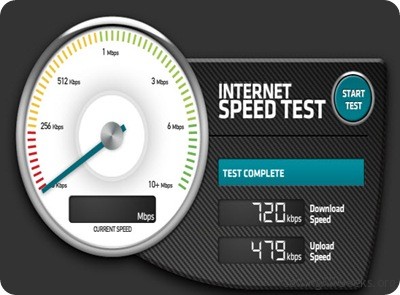
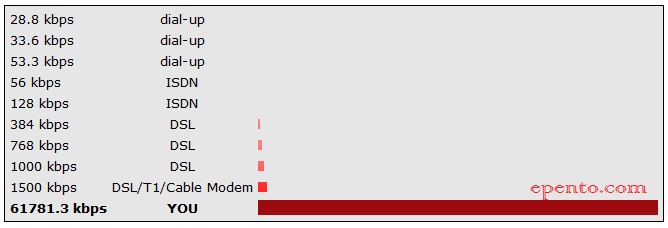
Have you ever felt your internet connection becomes slow? or your internet connection is super fast? How do we know our internet connection fast or slow? The way is easy. You only need to visit websites that provide tools to measure your internet speed. Well, there are a few of my favorite websites that provide tools to measure your Internet connection. Immediately, we begin.

1. SpeedTest.Net
Speedtest is a tool to test your internet speed and you can show your internet speed results to your friends. You can also show it through social networking sites and email.

2. 2wire

Tool This quick and simple. When you visit this website, this website immediately start testing your internet connection speed and deliver results.

3.Speed.io

Speed.io does not require any type of information to be entered before starting the test. Immediately after You came / Speed.io visit to the website and click on Start, then it will begin testing the internet speed and you can share results with others in the form of text and graphics.

5. Test Internet Speed 

Internet Speed Test Internet speed and provide a free scan system. Error and virus programs are 2 reasons that make the connection so slow. This website provides a free scan for both

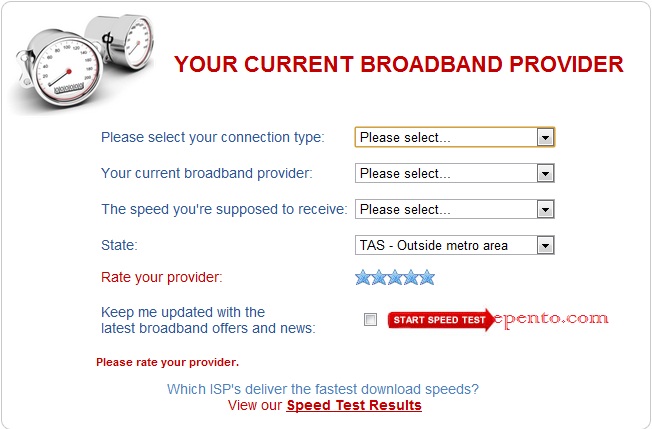
6. Broadband expert.


We need to fill in entries such as which connection we use, service providers, provider ratings, our country etc. before starting the test.

7. CNET Bandwidth Meter

CNET Bandwidth Meter provides Internet speeds of all types of connections such as satellite, broadband, etc.. CNETl it will ask your location using a connection that is your home, office, or school to give accurate results.

8. BandWidthPlace

BandWidthPlace also provide the results to download and upload speeds like other Internet speed test tool. It's simple and fast tool if used.

9. iSpeedOMeter
iSpeedOMeter provides online tools to check your internet speed and the application of the iPhone to check your internet speed even when you travel.

10. AuditMyPC
The best part of this online tool is to check all the speed of the internet is connected. such as broadband, DSL, cable, etc.. but to use this tool, you must have the latest version of java on your computer. (callingallgeeks).


Note: Without any comment from you, our board member of the World-Content will not know what you want in a blog ini.Untuk that we ask, you give a little comment to this blog so that our progress is also pleased to offer the data you want on the blog this !!!...
Trim before, for your attention and visit you guys!
                                                             

"Your comment is precious little for the progress of this blog ..."
Read more »

 
Powered by Blogger